So anybody who knows a little about computers becomes their friend's and family's de facto sys admin. Or at least the goto gal/guy when they have a computer panic. Here is a very useful site for one page selection of all of those open source / free software packages that everyone uses.
You go to this website select the software you want to install, click get installer & you're off. You can even tell people to do this over the phone fairly easily. It seems to clean out most irritating toolbar addons and it automates the installs so yer granny can do it too!
ninite.com
What puts them higher on my list of great sites is the fact that they also have a linux version
ninite.com/linux
Thanks to Brian @ Central Microsystems for pointing this out to me.
Thursday, October 14, 2010

Monday, July 19, 2010
Humane Reader
http://humaneinfo.com/
The Humane Reader is a low-cost device which can bring a five thousand book library into a home or school which has no other access to internet content. The Reader can be produced in quantity for approximately $20 per unit, and uses any existing television set as a display device for Wikipedia or other content. It is available to NGOs, educators, non-profits or other aid agencies.
created by Braddock Gaskill
" For those of us who believe in open source and open standards as a vehicle for having a postivie impct on our world, this is great project."
Humane Reader
Wikipedia for EveryoneThe Humane Reader is a low-cost device which can bring a five thousand book library into a home or school which has no other access to internet content. The Reader can be produced in quantity for approximately $20 per unit, and uses any existing television set as a display device for Wikipedia or other content. It is available to NGOs, educators, non-profits or other aid agencies.
created by Braddock Gaskill
" For those of us who believe in open source and open standards as a vehicle for having a postivie impct on our world, this is great project."
Monday, May 17, 2010
Backup, backup, backup
The three most important activities when it comes to computers are backup, backup and backup. Ask any ICT professional who has been working for a few years how many modes of backup they use and most will tell you it is better to have two copies of your data and best to have more than that...
Ok several copies may be overkill for most people but most people also do not want to loose their family photos, tax and other official receipts which now live on computers.
Organization
For software that you buy on CD/DVD or free software that you download to install it is not necessary to back this up as you can reinstall from the original and/or re-download. It is a pain but often easier than a full restore. You are, of course, keeping all of your original software CDs and DVDs in a folder marked Computer in your file drawer. For data it is easier to backup if you keep it all in the same place. On Windows XP it is best to keep data in My Documents folder and its sub folders. On Windows 7 in Documents folder and its sub folders. If you have multiple different userids to logon to the computer you will need to backup each one.
Local Backup
So everyone should have an external hard drive or thumb drive to periodically copy their "I would hate to loose this" data. The simplest method is, whenever you think ooo that's a great shot of ... drag your My Documents or Documents folder to the usb drive. Not the most secure and safe method but at least you have a copy.
Offsite Backup
Professionals keep some backup offsite, in case something happens to the "computer room". This used to be expensive or at least awkward to implement but now we have online (almost cloud) storage services. For most of these you have to sign up but you don't have to pay until you get into large quantities of data or large files... In no particular order:
Some of these are simple storage like the external hard drive (ADrive, Dropbox) but instead it is out there in the "cloud". Some offer backup services that will take care of backing up data that changes on your hard drive (Mozy). Some you have to install software others have a browser interface. For all of them somebody else takes care of ensuring that that disk does not get damaged and all that stuff associated with keeping data and hardware safe.
BUT remember you are putting your data in someone else's hands, read the privacy and service agreements before you decide to use any of them.
Another option for offsite backup is to take the external or thumb drive & bring it to your granny's house for safe keeping.
Ok several copies may be overkill for most people but most people also do not want to loose their family photos, tax and other official receipts which now live on computers.
Organization
For software that you buy on CD/DVD or free software that you download to install it is not necessary to back this up as you can reinstall from the original and/or re-download. It is a pain but often easier than a full restore. You are, of course, keeping all of your original software CDs and DVDs in a folder marked Computer in your file drawer. For data it is easier to backup if you keep it all in the same place. On Windows XP it is best to keep data in My Documents folder and its sub folders. On Windows 7 in Documents folder and its sub folders. If you have multiple different userids to logon to the computer you will need to backup each one.
Local Backup
So everyone should have an external hard drive or thumb drive to periodically copy their "I would hate to loose this" data. The simplest method is, whenever you think ooo that's a great shot of ... drag your My Documents or Documents folder to the usb drive. Not the most secure and safe method but at least you have a copy.
Offsite Backup
Professionals keep some backup offsite, in case something happens to the "computer room". This used to be expensive or at least awkward to implement but now we have online (almost cloud) storage services. For most of these you have to sign up but you don't have to pay until you get into large quantities of data or large files... In no particular order:
- Mozy
- 2GB free
- unlimited $5/month
- annual and biennial subs available
- ADrive
- 50GB free personal use only
- 50GB @ $7/month
- 100GB @ $14/month
- etc
- Dropbox install software
- 2GB free
- 50GB @ $10/month
- 100GB @ $20/month
- 4shared
- 10GB free
- 100GB $80/year
- skydrive (Microsoft)
- 25GB free
Some of these are simple storage like the external hard drive (ADrive, Dropbox) but instead it is out there in the "cloud". Some offer backup services that will take care of backing up data that changes on your hard drive (Mozy). Some you have to install software others have a browser interface. For all of them somebody else takes care of ensuring that that disk does not get damaged and all that stuff associated with keeping data and hardware safe.
BUT remember you are putting your data in someone else's hands, read the privacy and service agreements before you decide to use any of them.
Another option for offsite backup is to take the external or thumb drive & bring it to your granny's house for safe keeping.
If you know of any other online storage services or have good or bad experience with any of the ones mentioned please email me.
Tuesday, May 4, 2010
May 4th is the Day against DRM
See the defective by design web page for complete details & what you can do.
Low Tech Overview What is DRM ??
Think of it this way, what if you bought a book, read it once. Then you pick it up to check a passage or to read again and the pages are wiped clean. This could be because you're wearing new glasses to look at it or you have a new lamp or you're reading it in another room, it doesn't conform to the initial situation so you are expected to buy it again. Does this seem fair or right to you or to the author? What if when that book is put on your shelves it checks the other books & determines that you didn't buy those from it's store so they too must be wiped. After that it sets up a list of everything that you have in your house and sends it to the store. The unspoken goal of most DRM is you don't own what you have bought...
Excellent illustration of the effect of DRM from xkcd.org

Protest with your money, do not buy DRM enabled products.
High(er) Tech Overview What is DRM ??
What is DRM? DRM is an acronym for Digital Rights Management which is a misnomer as it really restricts the rights of the person who bought the product. It is software that is added to products such as movies on DVD and bluray, eBooks, computers, games and other software to restrict access.
While DRM may be a minor inconvenience now and the products are pretty cool, not too expensive and fun to play with... In the future it may cause you to completely loose access to a product that you've purchased, un-install or disable software or media products and allow 3rd parties to have access to information on your computer. The fact that it has the potential to become a true monster with time is much more worrisome.
For example Amazon has a movie service that when you agree to the user agreement you allow the DRM software to monitor your hard drive....
This monitoring software apart from impacting your overall performance sends Amazon information about the software you have installed, the music & videos you have and information about your computer's interaction with other devices. If you remove the software your movies are removed with it. Microsoft Windows Media Player has a similar set of terms.... What next?
Apple is selling us DRM in some very nice packages, at least a lot of people are buying the iPhone & iPads. They have installed their own very restrictive DRM to protect eBook content. This is contrary to their stand on DRM with itunes, they took it off there after some protests. On top of that you can only buy software for the i-hardware from Apple, you can't move books or music to other devices you own and Apple can remotely disable apps, music or videos you have on your device. Is that ok with you?
Sounds like virus, black hat hacker, trojan activity doesn't it ??? But we allow it when we agree. Do you really trust Amazon, Microsoft or anyone for that matter with the contents of your disk drive? Protest with your money, do not buy DRM enabled products.
Low Tech Overview What is DRM ??
Think of it this way, what if you bought a book, read it once. Then you pick it up to check a passage or to read again and the pages are wiped clean. This could be because you're wearing new glasses to look at it or you have a new lamp or you're reading it in another room, it doesn't conform to the initial situation so you are expected to buy it again. Does this seem fair or right to you or to the author? What if when that book is put on your shelves it checks the other books & determines that you didn't buy those from it's store so they too must be wiped. After that it sets up a list of everything that you have in your house and sends it to the store. The unspoken goal of most DRM is you don't own what you have bought...
Excellent illustration of the effect of DRM from xkcd.org
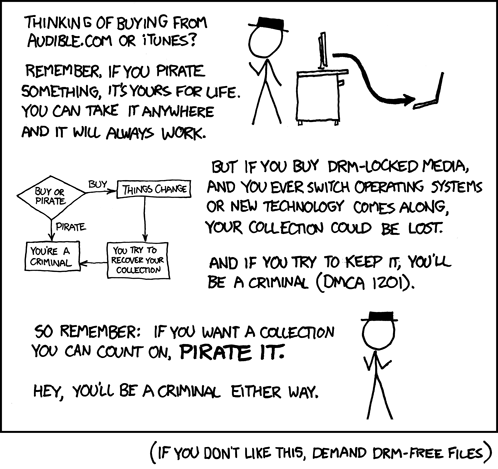
Protest with your money, do not buy DRM enabled products.
High(er) Tech Overview What is DRM ??
What is DRM? DRM is an acronym for Digital Rights Management which is a misnomer as it really restricts the rights of the person who bought the product. It is software that is added to products such as movies on DVD and bluray, eBooks, computers, games and other software to restrict access.
While DRM may be a minor inconvenience now and the products are pretty cool, not too expensive and fun to play with... In the future it may cause you to completely loose access to a product that you've purchased, un-install or disable software or media products and allow 3rd parties to have access to information on your computer. The fact that it has the potential to become a true monster with time is much more worrisome.
For example Amazon has a movie service that when you agree to the user agreement you allow the DRM software to monitor your hard drive....
This monitoring software apart from impacting your overall performance sends Amazon information about the software you have installed, the music & videos you have and information about your computer's interaction with other devices. If you remove the software your movies are removed with it. Microsoft Windows Media Player has a similar set of terms.... What next?
Apple is selling us DRM in some very nice packages, at least a lot of people are buying the iPhone & iPads. They have installed their own very restrictive DRM to protect eBook content. This is contrary to their stand on DRM with itunes, they took it off there after some protests. On top of that you can only buy software for the i-hardware from Apple, you can't move books or music to other devices you own and Apple can remotely disable apps, music or videos you have on your device. Is that ok with you?
Sounds like virus, black hat hacker, trojan activity doesn't it ??? But we allow it when we agree. Do you really trust Amazon, Microsoft or anyone for that matter with the contents of your disk drive? Protest with your money, do not buy DRM enabled products.
Tuesday, April 20, 2010
Monday, March 29, 2010
Windows (XP) and Printers
I often have problems with Windows when I add or remove printers. When I try to install new or reinstalling deleted printers I get that generic irritating message "Windows cannot connect to printer." This is especially irritating when I am reinstalling a printer because it stopped working so I know that Windows used to connect to it.
In the past I have used two solutions, to use either you must run as an administrator:
1. clear all spool files (stuck, cannot print)
2. clean the spooler install
In the past I have used two solutions, to use either you must run as an administrator:
1. clear all spool files (stuck, cannot print)
2. clean the spooler install
To clear all spooled files:
This will have you stop the print spooler, delete the spool files then start the print spooler.- Open the Service administrator: Start->Run->services.msc
- Locate the Print Spool service-> right click, select stop
- Open a commaind window: Start->Run->cmd
- cd c:\WINDOWS\system32\spool\PRINTERS
- del *.*
- Go back to the services window
- Locate the Print Spool service-> right click, select start
Clean the spooler install:
This will have you download and install the windows resource kit tools, then run the spool cleaner. n.b. you will have to reinstall *all* printers- Download Windows 2003 Resource Kit tools
- Install the downloaded file rktools.exe
- Open a commaind window: Start->Run->cmd
- cd c:\Program Files\Windows Resource Kits\Tools
- cleanspl.exe
- You will have to select a computer name (yours)
- Do not delete the 'Standard TCP/IP Port' print monitor nor the 'USB Monitor' print monitor
- Reboot your system
- Reinstall all of your printers
Tuesday, March 23, 2010
Thunderbird + google calendar
It is possible to configure thunderbird email client to view and update your google calendar!
If your addons are installed correctly you will see an Events and Tasks menu
2. Get the xml link for your calendar(s)
Follow the instructions above, after 2.4 pause and do the following
at Private Addresses there is a link Reset Private URLs, click on that then continue with 2.5 and the rest of the instructions.
Configuration
1. Install 2 addons for thunderbird:If your addons are installed correctly you will see an Events and Tasks menu
2. Get the xml link for your calendar(s)
- sign into Google Calendar:
- click on settings (upper right hand side of the page)
- under Calendar Settings heading, click on calendars
- click on the calendar you want to see in thunderbird
- at the bottom there is a section Private Address:, click on the XML link, a url will pop up in a window, copy that url to use in thunderbird. (ex: drop it into a text editor or leave it in the clipboard.
- select the File menu (upper left hand side of the window)
- select New
- select Calendar
- select On the Network
- select Google Calendar (if you do not see it reinstall Google Provider addon)
- paste the XML link from step 2.5 into the Location box
- you'll be asked for a userid and password
Troubleshooting
You may not be able to see your google calendar due to Thunderbird time zone settings:- Drop down the Tools menu
- select Options
- select Timezone tab
- set the timezone correctly.
Follow the instructions above, after 2.4 pause and do the following
at Private Addresses there is a link Reset Private URLs, click on that then continue with 2.5 and the rest of the instructions.
Monday, March 22, 2010
vim syntax colour markup can be turned off/on
You can turn it off using last line mode (:)
- off :syntax off
- on :syntax on
You can change the displayed font size in firefox
If the text is too small to read or takes up too much of a page you're viewing firefox has a builtin zoom:
ctrl + will enlarge the page (hold down control key hit plus sign)
ctrl - will shrink the page (hold down control key hit minus sign)
Or use the Scroll wheel
ctrl 0 resets it to default (hld down control key hit 0)
can be done multiple times, each time will increase/decrease the font size more.
ctrl + will enlarge the page (hold down control key hit plus sign)
ctrl - will shrink the page (hold down control key hit minus sign)
Or use the Scroll wheel
ctrl scroll up will enlarge the page (hold down control key move the scroll wheel up)
ctrl scroll down will shrink the page (hold down control key move the scroll wheel down)
ctrl 0 resets it to default (hld down control key hit 0)
can be done multiple times, each time will increase/decrease the font size more.
Subscribe to:
Comments (Atom)